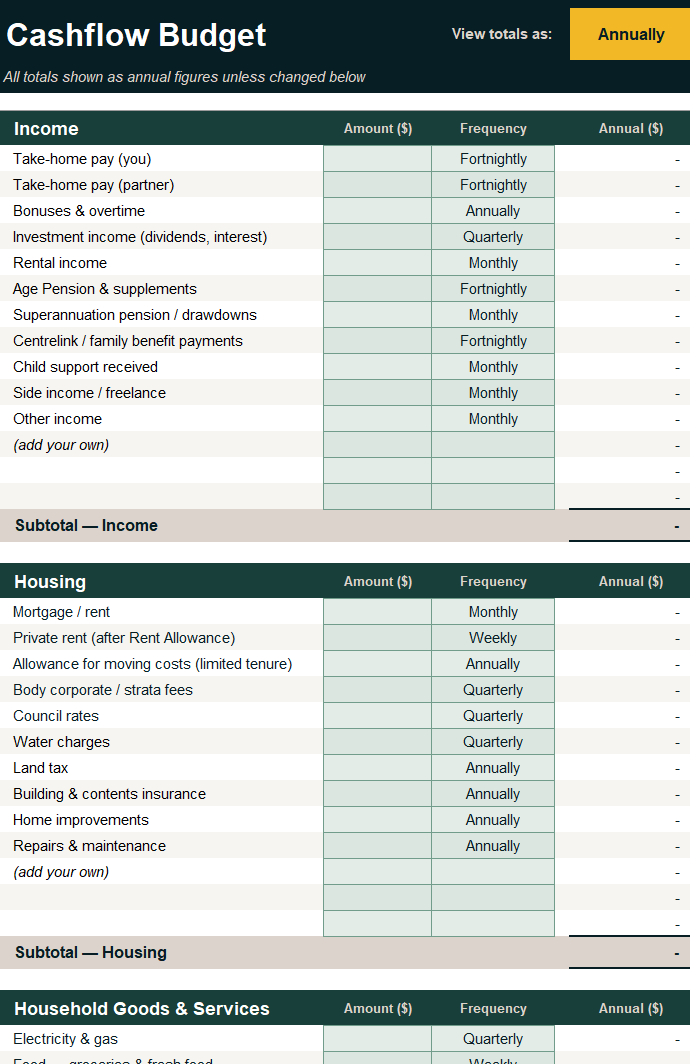
A clear view of where your money goes — and where it could go.
The Pekada Cashflow & Budget Planner is a free Excel tool that helps you capture your full financial picture before your next advice conversation. Complete it at your own pace and bring it to your next meeting.
What’s included
- Income across all sources Employment, super, Age Pension, Centrelink, investment returns, rental income, and more — every stream captured in one place.
- Detailed expense categories Housing, food, transport, healthcare, leisure, insurance — with customisable line items so no spending goes unmapped.
- Any frequency, automatically converted Enter amounts weekly, fortnightly, monthly, or quarterly — the planner converts everything to annual figures and can switch views on demand.
- A summary tab at a glance A single-page summary shows total income, total expenses, spend by category, and your savings rate — ready to share with your adviser.
- Fully customisable Rename any line item by typing over it. Three blank rows per category let you add anything not listed without breaking the formulas.
- Colour-coded and easy to follow Green cells for your inputs, grey for calculated values — the layout guides you through without accidentally overwriting a formula.
Four steps to a complete cashflow picture
- Download and open — Open the file in Microsoft Excel. Start on the Cover tab for a quick orientation.
- Enter your figures — Type amounts into the green input cells and select how often each one occurs — weekly through to annually.
- Customise as needed — Rename line items or add your own using the blank rows at the bottom of each category. Subtotals update automatically.
- Review and share — Check the Summary tab for your annual position, savings rate, and spending breakdown. Share with your adviser or bring it to your next meeting.
This planner is general information only and does not constitute personal financial advice. Pekada recommends speaking with a licensed financial adviser before making decisions based on the figures above.